Tag Archives: Adobe

Adobe Cloud Storage: Bug or Deception?

After some sleuthing and head scratching I noticed an issue with the way Adobe Storage manages data in the cloud.

Free accounts receive 5GB of storage space which can be exceeded under certain conditions. For example, uploading multiple files at once which exceed the limit.

If further uploads are attempted after hitting the limit, a red message bar will appear at the head of the page, notifying users that they have run out of space and must either upgrade their account or remove files.

So far this is pretty normal as one might expect of a cloud storage service.
The Bug

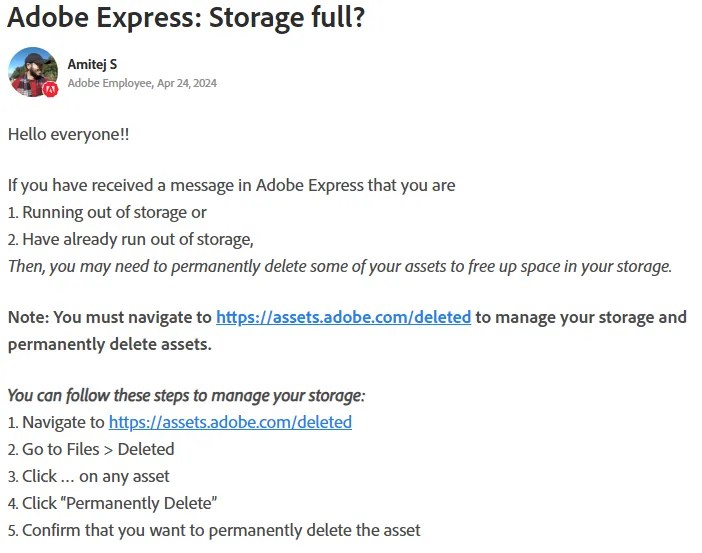
However, the issue is that many users find that the storage overage message does not go away or nor does it decrease in size as files are permanently deleted from storage.

This has likely led users to paying for a subscription to increase the storage capacity of their accounts as a way to bypass the “bug.”

But I don’t think it is a bug. I think this is an intentional effort by Adobe to drive users to subscribe. It’s a money machine. Just my opinion.

My Answer

Adobe cloud storage appears to be associating the entire amount of storage overage to all files present when the limit is exceeded. If even a single file remains, all limit overage will be attached to the single item.

I have successfully recreated the issue and fixed it using the method provided below.

After encountering the storage bug, I deleted all but a single 12mb file from my cloud storage. The message read that I was 2.71GB over my 5GB storage capacity.

I was planning on using the remaining 12mb file to create a Short for YouTube after I cleared the storage bug.

I would expect most users to have files in storage that they would rather not have to delete, whether for business or personal use. It’s quite common.

The red bar remained in place after permanently deleting the files, and the overage amount (7.71GB) did not change.

Rebooting, clearing cache, and cookies, had not effect. Following the instructions provided by Adobe Support members also did not clear up the issue.

Since I had a copy of the video file still on my hard drive, i went ahead and sent the last file to the Trash. Then I navigated to Trash and selected the file and Delete Permanently.
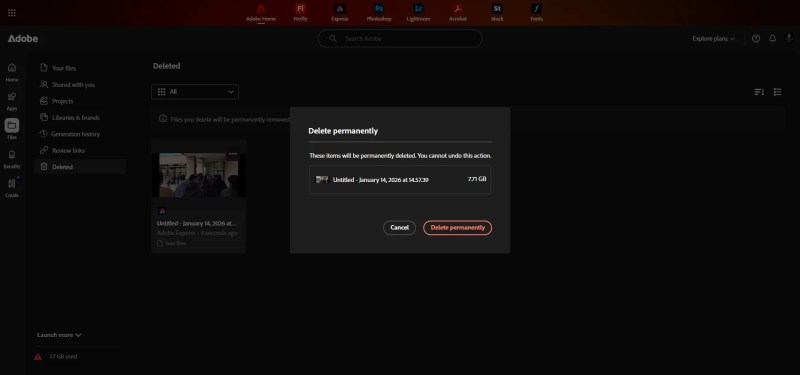
You can see in the image above that the system had relegated the entire 7.71GB storage limit overage to the single remaining file in my cloud storage.
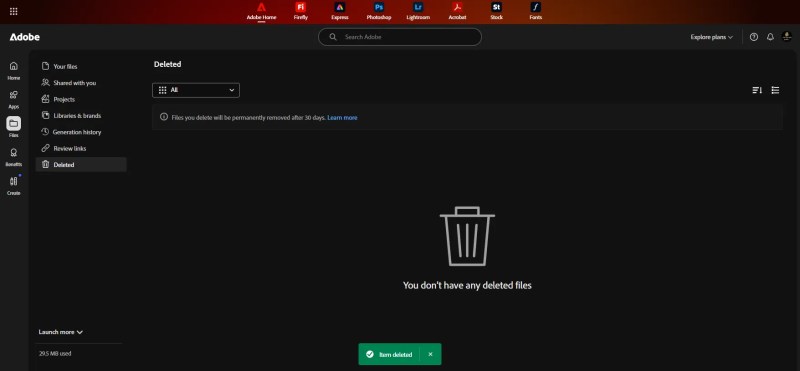
An after I deleted the final file, my storage was cleared and the overage message disappeared.

The Adobe Fiasco

Is it time to drop Adobe?

As you have likely heard by now Adobe, the software company, is facing yet another scandal.

A simple search for “Adobe” on Google or YouTube will bring about a long list of negative articles and videos showcasing the many failures of this firm.

The FTC, an American regulatory organization, has charged Adobe with deceiving consumers about early termination fees and inhibited cancelation of services.

They are now saying that company executives hid those fees behind multiple layers in contracts, in small print, and charged as much as half a years worth of subscription charges  as an early cancelation fee.

Soon Replaced?

AI is the new camera,

this headline was another recent blunder by Adobe staff.

It was such an unfortunate expression considering the vast majority of Adobe users are photographers and filmmakers whose livelihoods  are being threatened by the rise of generative AI.

Changes in the terms of service for the software have suggested that Adobe intends to use the personal photos and other media that users have stored on their cloud accounts to train its new Firefly AI software.

This betrayal and theft of data has enlarged the outcry by customers and pundits of the industry.

Before that, in 2013, Adobe was hacked and at least 38 million creditcard numbers were released. It was found during the investigation that Adobe had used the same encryption password for all of the accounts.

Then there were the kickbacks to federal employees, 3 million (USD) to employees to get them to choose Adobe software for their computer systems.

The more recent scandals have shaken the confidence of common users of the software and has led to a mass drive to cancel and calls for a boycott.

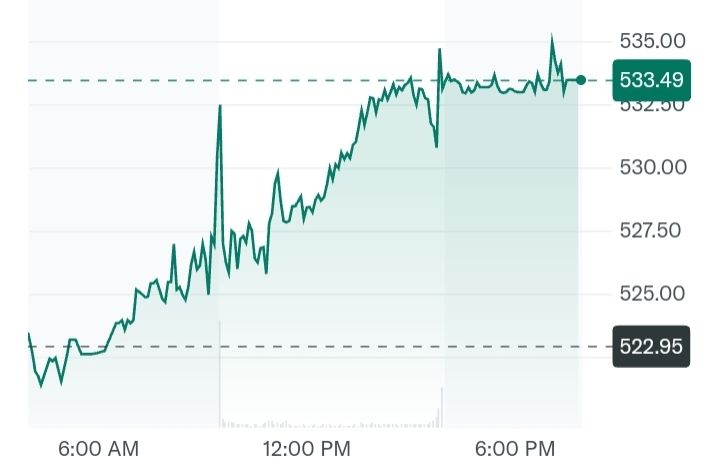
Adobe stock is running strong.

Despite the online shame, Adobe’s stock price has not seen great losses and shareholders continue support the embattled company. Since it’s early IPO at 17 cents (USD) to today’s 533 dollars per share, investors remain confident.

It likely will not end with this action by the FTC. Consumer led lawsuits are on the way. Although those rarely lead to a beneficial return for affected users.

If you have suffered a loss or feel you have cheated or defrauded by Adobe your best bet in my opinion would be to send a demand letter.

You can find guides for demand letters on YouTube. Demand letters are often used to extract funds from nefarious robo-callers.

There are sure to be more scandals on the horizon unless the administration of the firm see’s a restructuring or a change of the guard.

As time will tell, bad actors make for bad leaders.


Do you use Adobe software? What do you think about this current scandal.

Do you plan on switching or sticking with Adobe? Drop me a comment.