Tag Archives: MyPoints

Earth Inc | MyPoints

Last Updated: Feb 15th, 2026

Idle Game | Tycoon | Incremental Game

Become the CEO of Earth Inc. and grow into the mining tycoon you were always meant to be! Dig down to the core, discover unique treasures and gold, and get rich in this idle mining simulator!

(Available On Android)

Offer Terms

  • Must be installing Earth Inc for the first time to receive Points.
  • In-app purchases and upgrades are available.
  • Award will pend for 10 days
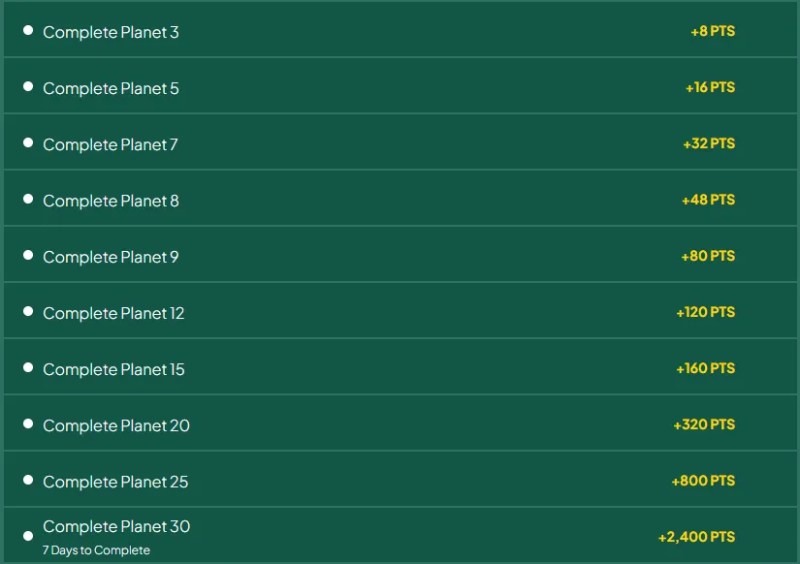
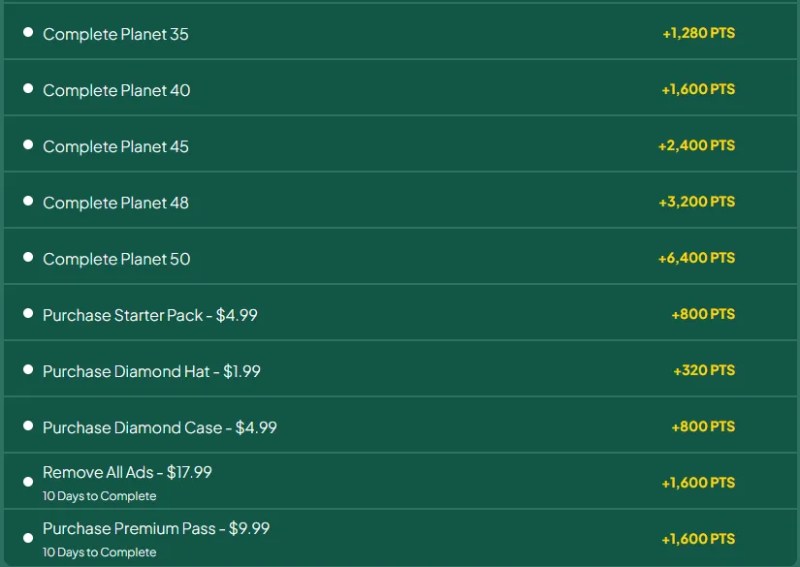
  • You must complete goals within 30 days of installing to receive Up to 23,984 Points

There is a single Bonus point goal for Planet 30 to be completed by day 7 for a reward of 2.4k points ($16).

Spending Goals

Spending for this offer is mostly reimbursed with the exception of the “Remove All Ads” option for $17.99, with reward points only valued at $10.67.

Both the ad removal and premium pass purchases must be completed within the first 10 days of play. Generally, these types of purchases should be completed on the first day of play to get the maximum benefit.

Total spending for this offer is $40 with $32 in reimbursement. The point earnings from Planet 3 through Planet 25 is 1,584 or $10.56, this is enough to cover the shortfall in spending goal reimbursements.

Essentially, if you decide to complete all spending goals, you will be at breakeven by the time you reach Planet 25.

Gameplay

As with most idle tycoon games, this involves a lot of micromanagement and careful decisions on where to spend resources to gain the maximum benefits.

Speed in clearing Planets is important to reach out goals within the 30 day time limit on the offer. The sole Bonus point reward comes by reaching Planet 30 within 7 days of play.

Tips

  • Set your upgrade buying to “Next”, since that indicates when you’ll get a large increase.
  • Make sure you’re claiming your sporadic earnings (minigames, free powerup, etc), they’re easy to miss.
  • If you’re going to be offline for a while, stock up on power to avoid hitting an ice level whilst offline.
  • Prioritise quests, since the rewards are usually pretty good.
  • Use up TNTs and similar level-clearing powerups as soon as possible, to progress to more valuable ores.

Credit: Jake Lee (https://jakelee.co.uk/android-games-august-2024/)

MyPoints: Ally Bank Spending Account

This offer is for 22,000 points which comes out as roughly 146 USD. It would be a good idea to hop on this offer while the reward is still high.

Something to note is that this same offer on Swagbucks is only paying 10,000 SB which is 100 USD. So it is more valuable to complete this offer with your MyPoints account.

The offer terms are simple. You just need to open a spending account with an opening deposit of 25 USD and then set up direct deposit to the account within 60 days of account opening.

The offer says in the terms that it will not show as pending in the Activity Ledger, however, you will be able to see the little Yellow dot in your Visited list. The bank will check on the account and manually approve your offer completion after 60 days.

MyPoints: A Detailed Guide for New Users

MyPoints is from the same parent company as Swagbucks and InboxDollars. The main difference I have found is the point values are lower than the other two platforms. You are allowed to have a single account with each platform.


You can earn Points in a bunch of ways. For example:
Shopping online, using the site as a starting point
Clicking on emails they send out on behalf of partners
Booking travel with the sites you already trust
Taking surveys
Playing online games


Welcome Bonus for new users: Spend $20 or more (excluding taxes, shipping & handling, and special processing fees) through the MyPoints.com website, the Score! browser extension or Bonus Mail emails in the first 30 days of membership to receive a $10 Bonus in your account. A $10 Bonus will be awarded in the form of Points deposited into your MyPoints account: $10 Bonus = 1,750 Points. Full terms of the offer here.


Here is my Referral link MyPoints, which will get you an extra bonus, or if you prefer, you can use this non-referral MyPoints link.

  1. Click, sign up, register, and verify your account via email.
  2. You will also be prompted to verify via text message when you redeem your points.
  3. Complete some initial demographic questions to build your survey profile.
  4. Make sure to complete the signup on the landing page before navigating away, or it won’t count.

Completing your To-Do list each day can earn 10 points plus a little more for each task you complete.

A. Vote in the Daily Poll
Weigh in on the daily poll and see what other MyPoint members think.

B. Magic Receipts
Add an In-Store Deal to your shopping list.

C. Deal of the Day
Get Free Shipping On $85+ Order Earn 8 Points Per Dollar

D. Complete a Watch Activity
Earn 2 points while being entertained and informed.

E. Earn Points from Discover
Over 50,000 Points are waiting for you with MyPoints Deals.

F. Attempt A Survey
Earn up to 5 points for attempting a survey, even if you don’t qualify, up to 5 times a day.

G. Complete a Survey
Provide your opinions to partners and earn Points for completing a survey.

H.
Meet Your Daily Goal
Meet your personalized Daily Goal every day to earn 10 additional Bonus Points.


There are many other ways you can earn points that can be redeemed for gift cards.

  1. Shop: With the In-Store shopping, when you shop at participating local stores and pay with your eligible linked card, you will automatically earn points on qualifying purchases. You can also add items to your shopping list and then, after purchasing in-store, submit your receipts to get points for the corresponding items.
  2. Deals: On the top menu of the site, there is a Deals tab, and you can view Deals by category. You can search by category, including electronics, Health and Wellness, Home, Sports and Leisure, and Toys and Hobbies.
  3. Coupons: Earn 25 Points for each coupon you redeem at your local grocery store. Plus, earn 1 Point per coupon printed. A maximum of 500 coupon prints per month are eligible for Points, but there is no limit on the 25 Points per redemption. Points for the coupon print activity will be posted the next business day.
  4. Surveys: You can earn up to 5 points for attempting a survey. The surveys are sorted by Estimated time to complete, and they list the number of points you can earn if you qualify.
  5. Watch: Once you start the playlist, it will auto-play until completion or until paused by the user. You must complete this playlist to receive the points. It’s usually 5-10 videos.
    Videos are only available on the site via desktop or laptop, but you can earn additional Points for watching videos on your smartphone or tablet with the MyPoints TV app. Available in iOS and Android.
  6. Games: You can play “Cash” games that require a deposit and earn rewards. Cash Competitions is operated by WorldWinner.com. WorldWinner Rewards Points are different from the Points earned in the MyPoints program and may not be used for MyPoints rewards.
  7. Travel: You can use the MyPoints portal and links to book flights and hotel stays and earn points for the bookings. There are travel offers and travel deals available regularly.
  8. More: Some other options are the 7-Day Challenge, Search and Earn: using MyPoints as your default search engine will give you a chance at earning more points, and the Score! The browser extension will pop up offers and deals when visiting sites with a corresponding offer.