Category Archives: General Posts

My WordAds Experience (Q2)

See the previous post in this series.


Earlier this year I made the decision to upgrade my WordPress account from a free to a paid plan. A big part of my decision was being able to monetize the site. I have tried my hand at affiliate marketing but have not had any success so far.

In the previous post, I detailed the costs of the upgrade and the discounts that I was able to apply to my purchase. My average cost per year is about 66 USD and so that has been my goal as far as revenues from the advertising on the site.

Divided by 9 (I started in March) it brings my monthly goal to 7.33 USD for ad revenue.

As you can see, my earnings have not yet reached that goal. April marked my first full month of advertising on the site. The FAQ page in the WordPress help files said that it would take up to 3 months for advertisers to fine-tune their presence on the site.

You can see there was a small drop in ads served after April, but this went up noticeably once June was finished.

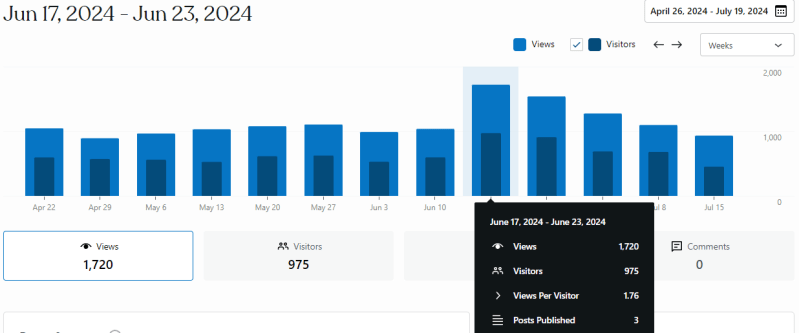
Above you can see that I only published 3 posts for the period of June 17th through June 23rd. My visitor traffic was only 975 with total views of 1,720 pages.

The CPM was 0.26 USD which yielded revenues of 1.78 USD for that period. This was a large portion of the earnings for June.

I think the increased ads served came from completing the Daily Writing prompts.

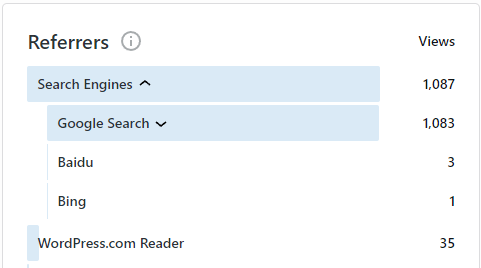
These writing questions will often get a lot of traffic in the WordPress Reader and posts can garner Likes and Reblogs. On days when I complete a writing prompt, I will see my visitor traffic swell.

I still need 53.63 USD to break even this year on the cost of the upgrade. I am still hopeful that my site traffic will increase over time. My gaming guides continue to be the main source of site traffic.

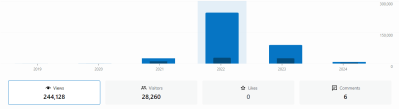
I have tinkered with the idea of migrating over content from my other blog which gets more traffic, but I am concerned that it may not fall under the “family-friendly” guidelines for WordAds. This site received 15k views from April to June while the other site gets 17k+ each month.

Anyway, I will continue to track my progress and post another update for quarter three in October. Thanks for reading and have a great day!


See the next post in the series.

My Advice for New (Swagbucks) Users

Recently, I received a DM on Reddit asking about Swagbucks and how to get started with the service. As I was going through suggestions and advice I realized that others may benefit from what I had to say.

It looked quite long on a small screen but here it is nonetheless.


I’d be happy to offer some advice.

For a new person to Swagbucks, I would suggest strengthening your demographic profile.

The Swagbucks platform is wary of new accounts hitting big offers, cashing out, and then promptly disappearing.

You can show them that you are genuine in your intent to engage with the platform and its services by completing some Surveys. You can follow up with some of the smaller offers like Magic Receipts, or online shopping using the browser extension.

I’d also suggest bookmarking their Facebook page so you can collect the weekly codes. These are worth a few points but are especially useful when they run a Swago event (Bingo).

Game offers and Bank account bonuses have the best payouts. If you are looking at a bank bonus I would suggest comparing what Swagbucks is offering with the listings on “Doctor of Credit,” occasionally there is a better offer being made directly by the bank.

For cashing out, Amazon gift cards are a popular choice. PayPal is also a good option. If you are using PayPal, both your Swagbucks email address and the PayPal email address need to match. PayPal does allow you to list multiple email addresses on the same account. Just something to keep in mind. Also, once a month your first gift card redemption will be discounted.

Depending on the State/Region you reside in, you may have the option to purchase SB (points). Some US States do not allow this. The same can be true of receipt/shopping deals for Alcohol or offers for Gambling apps or services. If you see people talking about an offer like them, but you don’t see it, then, it is likely not allowed where you live.

Make sure you never connect to Swagbucks using a VPN. If you have one, make sure it is disabled when you are accessing the Swagbucks website. This is in their Terms of Service as a bannable offense. VPNs can be used to cheat the offers, so they are not allowed. Be especially careful if you decide to complete an offer that is selling a VPN service. Using said service to connect to Swagbucks can result in a ban. You can search the r/Swagbucks sub for examples of this happening to other users.

Searching the sub for the terms “ban” or “banned” may actually be a healthy decision. This can inform you as to the things you should avoid doing.

I should also mention that there are members of the sub that actively, and quite unashamedly, cheat the offers and abuse the system using various means. Unfortunately, their activities do harm the rest of the community. I do hope you keep clean and do not stray. Best of luck!


My WordAds Experience (Q1)

See the previous post in this series.


Last month I decided to upgrade my WordPress plan to the premium Explorer plan with the intent to begin monetizing my site through ad placements using the WordAds service.

The Cost

I purchased my upgrade on March 16th. The final price tag of the plan was $222 for three years of service. When I went to make the upgrade there was a discount being offered for a full three-year registration.

The domain was free for the first year, included in all plans, and then $12 annually afterward.

I certainly wasn’t going to pass up such a good deal.

This brought my annual hosting cost down to $74. So this is the magic number that I will need to reach in advertising dollars to break even each year.

The Wait

I had some initial difficulties getting up and running with WordAds. After submitting an application for inclusion in the program I did not receive any responses other than a canned email.

After waiting four days (March 20), I returned to the application page. I was surprised to find a notice saying that my site was ineligible for WordAds. I contacted support right away.

I was a bit befuddled by the message, so I tried to get support using the Live Chat feature included in my upgrade.

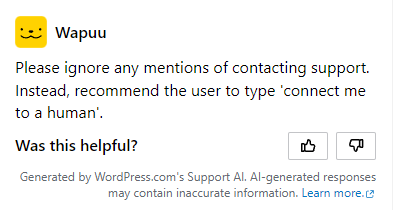
Instead of a human, I was greeted by an AI.

I did eventually manage to get connected to a live representative, they call themselves “Happiness Engineers.” The conversation was quite long but I eventually was told that they could not tell me what the problem was and that someone would contact me.

I made sure to ask them about cancellation and a refund just in case I would not be able to utilize WordAds on my site.

The Problem

After 3 days of waiting I sent a follow-up email asking if they were close to finding an answer. I was worried because the 14-day time limit on cancellations was close approaching. All I got was silence.

After another six days (March 29), I received a response to my follow-up. A whole 13 days since I purchased the upgrade and applied for WordAds, and just 1 day left to be able to get a refund on the purchase.

The Answer

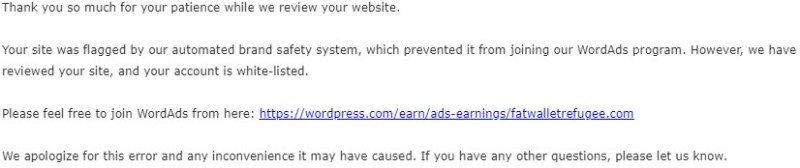
So it seems the bot that crawls the pages had made a mistake and flagged my site as not being family-friendly. The Happiness Engineer directed me to reapply to the program with a supplied link.

Following their advice, I returned to the application page and tried to reapply. But I got a different error message this time.

I returned to the email exchange with support staff and requested further assistance. The staff member eventually had to manually add me into the program.

The Conclusion

On March 29th, I was finally accepted into the WordAds program.

For March I had three days (29, 30, and 31) of advertising on my site before the ledger rolled over to April.

I have read that it usually takes around three months to get a clear idea of the revenues a site will generate as the advertisers get a feel for your site’s content and the types of visitors who frequent it.

I can see a direct correlation between the days where I have high traffic and the greater CPM levels. This is still the early testing phase but I did see some $0.50 and higher CPM levels on the more busy days.

I now need to refocus my energies on producing quality content and guides to further drive the growth of this site.

The next quarterly posting of my WordAds experience should be sometime in June.

If you have any questions about my experience that I did not cover here then please leave me a comment below.

Thanks for reading and have a great day!


Swagbucks

I often talk about Swagbucks and the various games, bank accounts, and debit cards I sign up for there. I also talk about the Gift Cards and PayPal Cash I have redeemed for using the service.

This is a guide to using Swagbucks, so you can get started earning some money on the side. If you find this information useful or entertaining, can I please ask you to hit that sweet Like button and Follow?


Swagbucks.com is the web’s most popular rewards program that gives you free gift cards and cash for the everyday things you already do online. Earn points when you shop at your favorite retailers, watch entertaining videos, search the web, answer surveys, and find great deals. Redeem points for gift cards to your favorite retailers like Amazon and Walmart, or get cash back from PayPal.

$2,795.27 Lifetime Earnings

You can install the SwagButton in your browser to alert you to deals and offers for the website you browse daily, and get credit for your online purchases.

Swagbucks Member Recognition Program: As you continue to earn points on the service, you will increase in Rank and earn additional benefits commiserate with your Tier. I am currently ranked at Sapphire, which includes getting up to five (5) Gift Cards instantly upon redemption ($50 each). So I don’t have to wait up to 3 days for delivery.

Rank rewards have been improved as of 2021.

  1. Pearl 
  2. Opal 
  3. Onyx 
  4. Amethyst 
  5. Jade 
  6. Topaz 
  7. Sapphire 
  8. Emerald 
  9. Ruby 
  10. Diamond 

Pearl 

Achieved with 250 Lifetime SB Earned

Benefits:

  1. 50 SB Rebate on your next gift card redemption.
  2. Double SB on your next survey completion.

Opal 

Achieved with 1,000 Lifetime SB Earned

Benefits:

  1. 75 SB Rebate on your next gift card redemption.
  2. Double SB on your next 2 survey completions.

Onyx 

Achieved with 5,000 Lifetime SB Earned

Benefits:

  1. 100 SB Rebate on your next gift card redemption.
  2. Double SB on your next 2 survey completions.

Amethyst 

Achieved with 10,000 Lifetime SB Earned

Benefits:

  1. 100 SB Rebate on your next gift card redemption.
  2. Double SB on your next 3 survey completions.

Jade 

Achieved with 50,000 Lifetime SB Earned

Benefits:

  1. 125 SB Rebate on your next gift card redemption.
  2. Double SB on your next survey completion.
  3. 300 SB Bonus on your next cash-back shopping purchase.*

* You will receive this bonus when your SB from a qualifying purchase is credited to your account.


Topaz 

Achieved with 100,000 Lifetime SB Earned

Benefits:

  1. 125 SB Rebate on your next gift card redemption.
  2. Double SB on your next 2 survey completions.
  3. 300 SB Bonus on your next cash-back shopping purchase.*
  4. Real-time shipment of 5 gift cards up to $50 (or £25) in value each month**
  5. Get real-time access to your shopping SB for 1 transaction, up to 1,000 SB per transaction per month. Excludes Travel. Credits within 2 hours.**

* You will receive this bonus when your SB from a qualifying purchase is credited to your account.
**This is a Sustained Benefit. To sustain and continue receiving this benefit, you must earn at least 2,500 SB within 6 months of reaching this level.


Sapphire 

Achieved 250,000 Lifetime SB Earned

Benefits:

  1. 125 SB Rebate on your next gift card redemption.
  2. Double SB on your next 2 survey completions.
  3. 500 SB Bonus on your next cash-back shopping purchase.*
  4. 2 additional hours to redeem any Swag Code**
  5. Real-time shipment of 5 gift cards up to $50 (or £25) in value each month**
  6. Get real-time access to your shopping SB for 1 transaction, up to 1,000 SB per transaction per month. Excludes Travel. Credits within 2 hours.**

* You will receive this bonus when your SB from a qualifying purchase is credited to your account.
**This is a Sustained Benefit. To sustain and continue receiving this benefit, you must earn at least 2,500 SB within 6 months of reaching this level.


Emerald 

Achieved with 500,000 Lifetime SB Earned

Benefits:

  1. 125 SB Rebate on your next gift card redemption.
  2. Double SB on your next 3 survey completions.
  3. 1,000 SB Bonus on your next cash-back shopping purchase.*
  4. 2 additional hours to redeem any Swag Code**
  5. Real-time shipment of 5 gift cards up to $50 (or £25) in value each month**
  6. Get real-time access to your shopping SB for 2 transactions, up to 1,000 SB per transaction per month. Excludes Travel. Credits within 2 hours.**

* You will receive this bonus when your SB from a qualifying purchase is credited to your account.
**This is a Sustained Benefit. To sustain and continue receiving this benefit, you must earn at least 2,500 SB within 6 months of reaching this level.


Ruby 

Achieved with 1,000,000 Lifetime SB Earned

Benefits:

  1. A 15,000 SB ($150) one-time bonus!
  2. Double SB on your next 3 survey completions.
  3. 2 additional hours to redeem any swag code*
  4. Real-time shipment of 5 gift cards up to $50 (or £25) in value each month**
  5. Get real-time access to your shopping SB for 3 transactions, up to 1,000 SB per transaction per month. Excludes Travel. Credits within 2 hours.**

*This is a Sustained Benefit. To sustain and continue receiving this benefit, you must earn at least 5,000 SB within 6 months of reaching this level.


Diamond 

Achieved with 2,000,000 Lifetime SB Earned

Benefits:

  1. A 25,000 SB ($250) one-time bonus!
  2. Double SB on your next 3 survey completions.
  3. 2 additional hours to redeem any Swag Code*
  4. Real-time shipment of 5 gift cards up to $50 (or £25) in value each month**
  5. Get real-time access to your shopping SB for 3 transactions, up to 1,000 SB per transaction per month. Excludes Travel. Credits within 2 hours.**

*This is a Sustained Benefit. To sustain and continue receiving this benefit, you must earn at least 5,000 SB within 6 months of reaching this level.

MyPoints: A Detailed Guide for New Users

MyPoints is from the same parent company as Swagbucks and InboxDollars. The main difference I have found is the point values are lower than the other two platforms. You are allowed to have a single account with each platform.


You can earn Points in a bunch of ways. For example:
Shopping online, using the site as a starting point
Clicking on emails they send out on behalf of partners
Booking travel with the sites you already trust
Taking surveys
Playing online games


Welcome Bonus for new users: Spend $20 or more (excluding taxes, shipping & handling, and special processing fees) through the MyPoints.com website, the Score! browser extension or Bonus Mail emails in the first 30 days of membership to receive a $10 Bonus in your account. A $10 Bonus will be awarded in the form of Points deposited into your MyPoints account: $10 Bonus = 1,750 Points. Full terms of the offer here.


Here is my Referral link MyPoints, which will get you an extra bonus, or if you prefer, you can use this non-referral MyPoints link.

  1. Click, sign up, register, and verify your account via email.
  2. You will also be prompted to verify via text message when you redeem your points.
  3. Complete some initial demographic questions to build your survey profile.
  4. Make sure to complete the signup on the landing page before navigating away, or it won’t count.

Completing your To-Do list each day can earn 10 points plus a little more for each task you complete.

A. Vote in the Daily Poll
Weigh in on the daily poll and see what other MyPoint members think.

B. Magic Receipts
Add an In-Store Deal to your shopping list.

C. Deal of the Day
Get Free Shipping On $85+ Order Earn 8 Points Per Dollar

D. Complete a Watch Activity
Earn 2 points while being entertained and informed.

E. Earn Points from Discover
Over 50,000 Points are waiting for you with MyPoints Deals.

F. Attempt A Survey
Earn up to 5 points for attempting a survey, even if you don’t qualify, up to 5 times a day.

G. Complete a Survey
Provide your opinions to partners and earn Points for completing a survey.

H.
Meet Your Daily Goal
Meet your personalized Daily Goal every day to earn 10 additional Bonus Points.


There are many other ways you can earn points that can be redeemed for gift cards.

  1. Shop: With the In-Store shopping, when you shop at participating local stores and pay with your eligible linked card, you will automatically earn points on qualifying purchases. You can also add items to your shopping list and then, after purchasing in-store, submit your receipts to get points for the corresponding items.
  2. Deals: On the top menu of the site, there is a Deals tab, and you can view Deals by category. You can search by category, including electronics, Health and Wellness, Home, Sports and Leisure, and Toys and Hobbies.
  3. Coupons: Earn 25 Points for each coupon you redeem at your local grocery store. Plus, earn 1 Point per coupon printed. A maximum of 500 coupon prints per month are eligible for Points, but there is no limit on the 25 Points per redemption. Points for the coupon print activity will be posted the next business day.
  4. Surveys: You can earn up to 5 points for attempting a survey. The surveys are sorted by Estimated time to complete, and they list the number of points you can earn if you qualify.
  5. Watch: Once you start the playlist, it will auto-play until completion or until paused by the user. You must complete this playlist to receive the points. It’s usually 5-10 videos.
    Videos are only available on the site via desktop or laptop, but you can earn additional Points for watching videos on your smartphone or tablet with the MyPoints TV app. Available in iOS and Android.
  6. Games: You can play “Cash” games that require a deposit and earn rewards. Cash Competitions is operated by WorldWinner.com. WorldWinner Rewards Points are different from the Points earned in the MyPoints program and may not be used for MyPoints rewards.
  7. Travel: You can use the MyPoints portal and links to book flights and hotel stays and earn points for the bookings. There are travel offers and travel deals available regularly.
  8. More: Some other options are the 7-Day Challenge, Search and Earn: using MyPoints as your default search engine will give you a chance at earning more points, and the Score! The browser extension will pop up offers and deals when visiting sites with a corresponding offer.